Zip and unzip files with this free tool
ALZip is a free extraction and archiving tool that can help you open and create zip files. Designed for Windows, the software features a user-friendly interface that can help you view archived content quickly. It supports up to 40 different zip formats and comes with a range of useful functions, including password protection, anti-virus integration, and context menu addition. Moreover, ALZip for Mac has almost all the same features.
Top Recommended Alternative

What is ALZip?
Transferring or copying multiple files containing images, music, videos, or documents from one device to another can be tedious. However, if you compress all the files into one archive folder, sending it becomes a lot easier. ALZip download for PC is a lightweight tool that lets you create and extract files with the click of a button. Once installed, the app integrates with the context menu for easy access.
Available for free, the Windows software supports up to 40 archive formats. This essentially means that you can extract and compress almost all files that you receive. The application also offers a few additional functionalities, including an option to scan files for viruses and to add a password to files once you compress them.
Does ALZip have a simple interface?
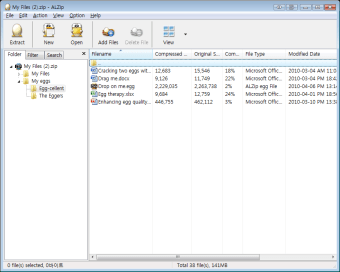
One of the reasons why ALZip free download is so popular is that it has a tree-view layout. Due to this design, it’s easier and faster to view the contents of any zip file. The modern and user-friendly dashboard also has a few essential features spread across the app’s window. For an esthetic appeal, the app has various bird-egg icons, similar to its logo.
Searching for an item in an archive file is easy when you use ALZip. That is because the program provides users with 14 different types of filters and sorters. You can look for any document or file via its name, format, file size, and other similar criteria. The app also lets users leave comments so they can return to an archive whenever they like.
How do I use ALZip?
Once the ALZip download for PC is complete, the app integrates itself in the context menu of Windows. This means that anytime you right-click on a file, you will see an option to compress or decompress it using ALZip. The app is also available as a separate application, which you can open when you need access to additional features.
When you open the ALZip app on your Windows 10 computer, you get an option to create an archive file or open one that already exists on your device. After you open an archive file, you can simply add or delete items as per your requirement or extract all items in one go. Additionally, the app lets you look up particular files using filters, sorters, and a keyword-based search bar.
Does ALZip have any additional features?
Apart from zipping and unzipping files, ALZip download for PC offers various advanced features, including password protection, encryption, and language encoder. The app also integrates with the installed anti-virus software such that anytime you extract a file, it first gets scanned by the existing security tool. Additionally, ALZip can even scan and identify any error in a file.
Password protection function not only lets you add a password to files that you archive but is also useful when you need to enter a passcode to open a zip file. Since the app offers both AES 128 and 256-bit encryption, you can be sure that your files are always safe from prying eyes. The app opens up to 40 zip formats, including ISO, RAR, and EGG formats, and can archive files in 8 formats.
Moreover, ALZip download includes a feature that lets you segregate archive files and set the compression level whenever creating a new zip. It’s also possible to convert the language when creating a new file, such that it can work on operating systems that use a different language. All of these ALZip features make the program stand out from its many competitors, including apps like WinZip.
What type of archive files does ALZip support?
ALZip app download supports almost all available archiving formats like ZIP, RAR, B64, ISO, BIN, CAB, ARJ, PAK, ICE, GZ, WAR, UUE, ZOO, BZ, JAR, TAR, and more. With the help of ALZip download for PC, you can open up to 40 types of archive formats. The free app also lets you compress files, supporting up to 8 file formats.
Is ALZip safe to use?
ALZip for Windows 10 is designed to create and open archives. It doesn’t take up too many system resources. It works well on both Windows 32- and 64-bit operating systems and doesn’t bother users with advertisements. The app also integrates with the computer’s anti-virus tool, so that it doesn’t extract any malicious content unintentionally.
Are there any alternatives?
One of the most prominent competitors of ALZip app download is WinRAR, an application that offers almost all the same features. However, unlike ALZip, the software is paid and only has a limited-period trial. Other applications that provide compression and extraction capabilities similar to this freeware are Bandizip and Zipeg.
Should I download ALZip?
If you’re looking for a tool that replaces an old compression tool, you should download ALZip. The free-to-use program offers users features that are often only available in paid programs. As an extraction tool, the app supports up to 40 archive formats. This means you can open almost any file using the software. You can also use the app’s comprehensive search functions to find any file.
When it comes to creating archive files, the program goes a step further. Not only does it support compression to up to 8 formats, but it also offers additional tools like language encoder, password protection, and encryption. The app is available in multiple languages and integrates with the context menu, as well as the existing anti-virus tool to make sure that it's always easy and safe to use.